This guide covers ai spreadsheet tools for finance teams with hands-on testing, real tradeoffs, and practical buying advice.
The Unique Requirements of Finance and Operations Spreadsheet Work
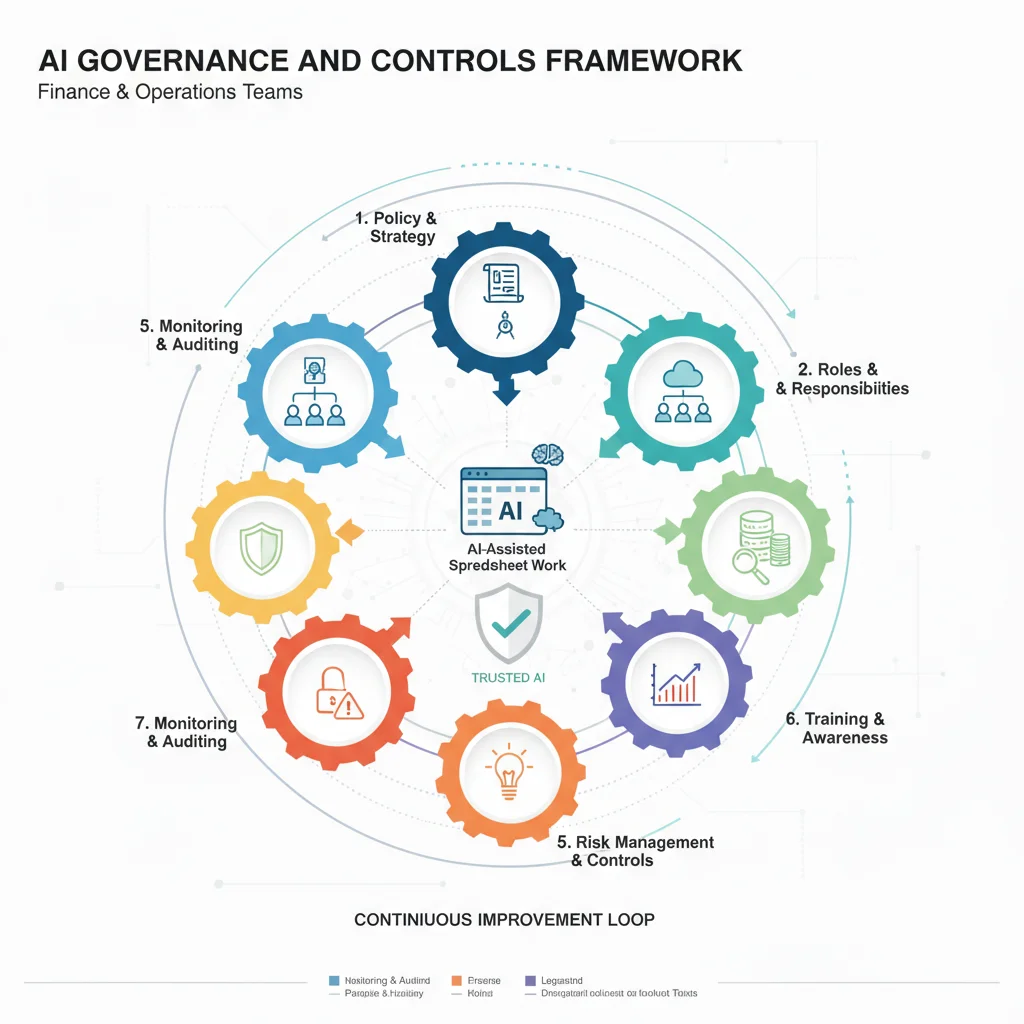
Finance and operations spreadsheet work has specific requirements that make AI adoption more challenging than in other business functions:
- Accuracy and auditability requirements: Financial and operational data often feeds into critical business decisions, regulatory filings, and audited financial statements. Errors or lack of auditability can have serious consequences.
- Regulatory compliance and data governance: Many finance and operations functions are subject to regulatory requirements (SOX, GAAP, IFRS, industry-specific regulations) that impose strict controls on data handling, calculations, and documentation.
- The need for human oversight and control: Finance and operations professionals have a fiduciary responsibility to ensure the accuracy and integrity of their work. Delegating critical work to AI without appropriate oversight is not acceptable.
These requirements mean that finance and operations teams cannot simply adopt AI spreadsheet tools the way other business functions might. They need to carefully evaluate tools, implement appropriate governance and controls, and maintain human oversight and accountability for all critical outputs.
1. Starting with Built-in AI Features (Excel Copilot, Google Sheets AI)
For most finance and operations teams, the best starting point for AI adoption is the AI features built into their existing spreadsheet platforms (Excel Copilot for Excel users, Google Sheets AI for Google Sheets users).
In our testing with finance and operations teams, starting with built-in AI features offered several advantages: - No platform switching or workflow disruption - Familiar interface and features that teams already know how to use - Integration with existing data sources, templates, and processes - Lower risk and easier governance compared to adopting new platforms
Most finance and operations teams should start with built-in AI features and only consider more advanced tools when they have specific business requirements that built-in features cannot meet.
Limitations: Built-in AI features may not provide all the advanced capabilities (live data integration, advanced AI features) that some teams need. Teams with specific requirements may need to evaluate dedicated platforms.
2. Adding Specialized AI Capabilities as Needs Develop
Finance and operations teams should add specialized AI capabilities (Coefficient, Rows, or other dedicated platforms) only when they have specific, measurable business requirements that built-in AI features cannot meet.
In our testing, the most successful finance and operations teams: - Started with built-in AI features (Excel Copilot or Google Sheets AI) - Evaluated their specific business requirements (live data integration, advanced AI features, specific workflow needs) - Only adopted dedicated platforms when they could clearly justify the investment with measurable business outcomes - Implemented appropriate governance and controls for any new tools
Adding specialized tools before developing a clear, justified need often led to unnecessary cost, complexity, and governance challenges.
3. Governance and Controls for AI-Assisted Spreadsheet Work
Finance and operations teams need to implement governance and controls that are appropriate for the risk level of AI-assisted spreadsheet work:
- Documentation and audit trail requirements: Document the use of AI tools for all business-critical work. Maintain audit trails for all critical calculations and decisions, regardless of whether they were AI-assisted or manually performed.
- Review and approval processes: Implement appropriate review and approval processes for AI-generated work, with the level of review proportional to the risk and materiality of the work.
- Data governance and security: Ensure that any AI tools meet organizational data governance and security requirements. Work with IT and security teams to evaluate data handling, access controls, and compliance.
- Training and competency: Ensure that team members understand the capabilities and limitations of AI tools and are trained on appropriate use and governance.
The level of governance should be proportional to the risk and materiality of the work being performed. Not all AI-assisted work requires the same level of controls.
4. The AI Spreadsheet Workflow That Works for Finance and Operations Teams in 2026
The most effective workflow for most finance and operations teams:
- Start with built-in AI for routine work: Use Excel Copilot or Google Sheets AI for routine formula writing, data formatting, and basic analysis within existing workflows.
- Add specialized capabilities for specific needs: If you have specific business requirements (live data integration, advanced AI features), evaluate and pilot dedicated platforms (Coefficient, Rows, or others) with appropriate governance.
- Maintain human oversight and quality control: Apply human review, verification, and quality control to all business-critical outputs, regardless of whether they were AI-assisted.
- Document and audit AI use: Maintain appropriate documentation and audit trails for AI-assisted work, proportional to the risk and materiality of the work.
- Regularly evaluate and update: Regularly evaluate the effectiveness of AI tools and governance processes, and update as tools and organizational needs evolve.
This approach typically delivers 30-60% time savings on routine spreadsheet work while maintaining the accuracy, auditability, and compliance standards that finance and operations work demands. The key is to use AI to accelerate routine tasks while maintaining rigorous human oversight and governance on all business-critical outputs.
Frequently Asked Questions
How can finance and operations teams use AI spreadsheet tools without compromising accuracy and auditability?
Use AI to accelerate routine and mechanical aspects of spreadsheet work (formula writing, data formatting, basic analysis) while maintaining rigorous human oversight, documentation, and quality control on all business-critical outputs. Always review and verify AI-generated work, document the use of AI tools, and maintain audit trails for all critical calculations and decisions. AI should make professionals faster and more effective, not replace human judgment and accountability.
Which AI spreadsheet tools are appropriate for regulated finance and operations work?
Start with built-in AI features (Excel Copilot, Google Sheets AI) which have the benefit of being part of established, regulated platforms with mature governance and compliance features. If you need specialized capabilities (live data integration, advanced AI features), evaluate Coefficient, Rows, or other dedicated platforms carefully for security, compliance, and auditability. Work with your IT, security, and compliance teams to ensure that any AI tools meet organizational and regulatory requirements.
How much governance and control is needed for AI-assisted spreadsheet work?
Finance and operations teams should implement governance and controls that are appropriate for the risk level of the work. This typically includes: documentation of AI tool usage, review and approval processes for AI-generated work, data governance and security controls, and audit trails for critical calculations. The level of governance should be proportional to the risk and materiality of the work being performed.
Can AI spreadsheet tools be used for SOX-compliant or audited financial work?
It depends on your organization's specific controls and the capabilities of the AI tools. Some organizations have approved the use of built-in AI features (Excel Copilot, Google Sheets AI) for certain types of work with appropriate controls. However, any use of AI for SOX-compliant or audited financial work requires careful evaluation by your internal audit, compliance, and IT teams. Document all AI tool usage and ensure that appropriate controls are in place.
How should finance and operations teams balance AI productivity gains with risk management?
Start with lower-risk use cases (routine analysis, internal reporting, non-material calculations) to develop experience and governance processes. As you gain confidence and develop appropriate controls, you can expand to higher-risk use cases. Always maintain human oversight and accountability for business-critical outputs, and work closely with your risk, compliance, and audit teams to ensure that AI use meets organizational risk management standards.
The Unique Requirements of Finance and Operations Spreadsheet Work
The finance and operations teams getting the best results from AI spreadsheet tools in 2026 are not the ones trying to minimize human involvement. They are the ones using AI to accelerate routine and mechanical aspects of spreadsheet work while applying rigorous human oversight, documentation, and quality control to ensure that all business-critical outputs meet the accuracy, auditability, and compliance standards that finance and operations work demands. Start with built-in AI features, add specialized capabilities only when justified by specific business requirements, and implement governance and controls appropriate for the risk level of the work. Expect 30-60% time savings on routine spreadsheet work, but invest in governance and controls to ensure that AI-assisted work meets the standards that finance and operations work demands.
See also: best ai tool for excel formulas and financial modeling 2026, best ai coding assistants 2026.