A customer success pod does not need another engineering jargon bake-off of meeting bots. It needs renewal risks, QBR commitments, and owners on the account a support agent opens tomorrow. If you are choosing an ai notetaker for customer success, judge writeback into CRM and ticket context—not transcript cosmetics aimed at architecture reviews.
Read this with the five-person SDR plus CS stack hub. Sales-side writeback lives on the CRM writeback for sales notes page and the Salesforce and HubSpot sync scorecard. Inbox deflection and handoff quality sit with the CS support workflow guide and the Gorgias vs Intercom Fin handoff page. This URL is only CS call memory as an operations job.
What CS actually buys when it buys a notetaker
For a tiny success team, “AI meeting assistant” is not a feature matrix. It is three write paths that must stay honest for ninety days:
- Identity: the contact on the QBR calendar is the same account and contact a CSM and a support agent share.
- Commitments: risks, product promises, and renewal next steps appear on the account—not only in a private Slack paste.
- Ownership: follow-ups do not orphan onto a shared integration user when a CSM rotates.
Support-readable fields matter more than fancy topic clouds. A ticket opener should see what was promised on the last business review without asking three people. If the notetaker UI is the only place truth lives, you bought a second silo.
HubSpot and Salesforce both lie in demos. A connector that looks clean on a vanilla Account layout can still create garbage once required fields, partner contacts, or renewal custom objects appear. If nobody can name which objects the bot may write for CS calls, you do not have a handoff workflow. You have a future “what did we promise?” thread.
The best AI notetaker for customer success is therefore an ops purchase: durable account writeback first, pretty summaries second.
Failure modes after a loud QBR week
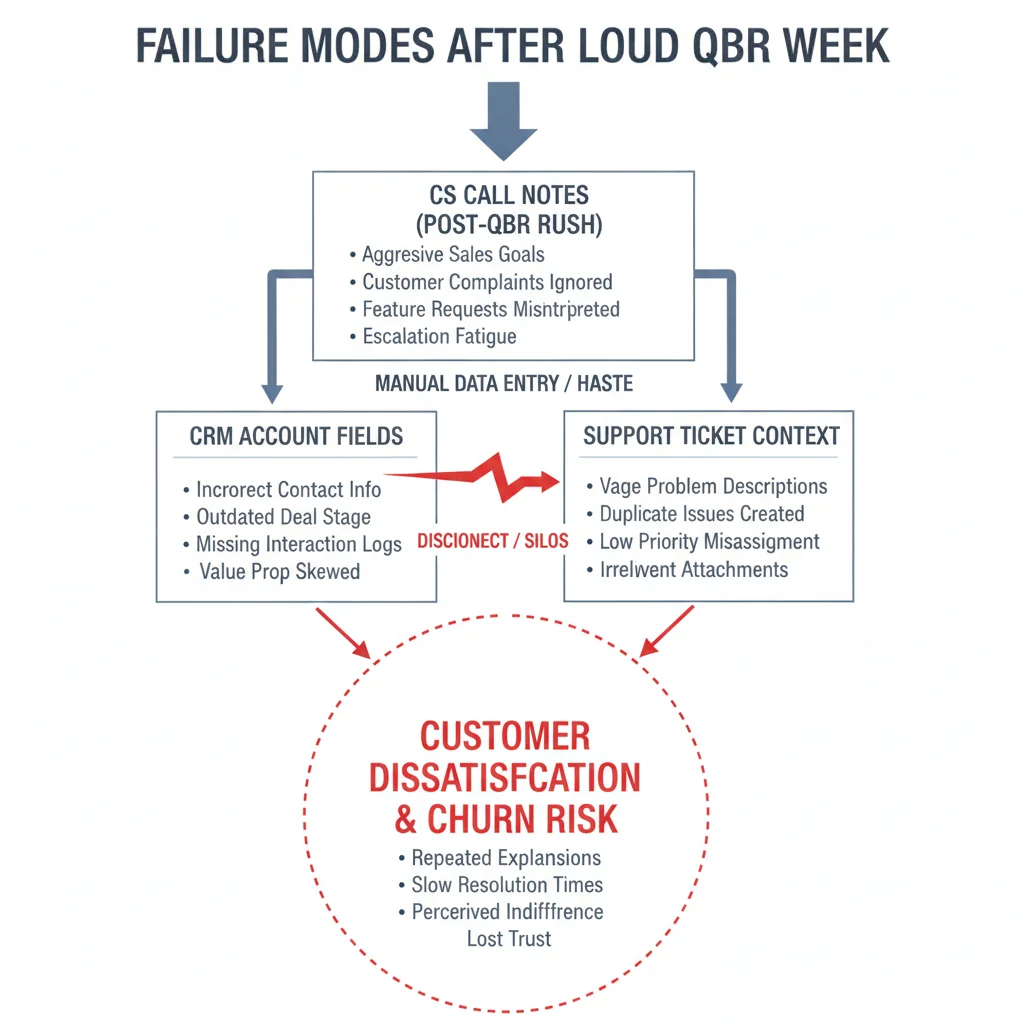
Week one always looks fine. The first ten synced notes have owners. Leadership screenshots the timeline and calls the pilot a win.
QBR week is where tiny CS pods get hurt:
- Notes stay in Slack because “the sync felt slow” and never return to the account.
- Risks land on the wrong account because matching used email alone and ignored parent hierarchy.
- Support tickets open with no renewal context, so agents re-ask questions the CSM already answered.
- A second “CS-only” bot joins calendars beside the sales bot and duplicates tasks across Opportunity and Account.
- Field maps that worked until a validation rule rejected writes silently—green “synced” badges lying.
The cost is not vanity metrics. It is three-plus hours a week of reconstruction once renewal season hits—time a five-person company does not have. Bad handoff also trains support to distrust CRM truth, so they rebuild side docs and ignore the account record.
If support still asks “what did we promise on the QBR?” every ticket, the notetaker is not doing its job.
A 90-day CS writeback scorecard
Run the pilot on your real org, not a sandbox with three fields. Capture at least thirty live CS calls across onboarding, QBR, and renewal segments. Score weekly:
- Duplicate task rate under five percent of integration-created tasks.
- Manual cleanup under one hour per week for whoever owns RevOps or CS ops (often the founder).
- Zero CSMs still pasting QBR notes into Slack as the system of record after week three.
- Support agents able to answer “last commitment” from the account or ticket sidebar without opening the notetaker.
- After any permission, validation, or package change: sample twenty synced account records within forty-eight hours.
Kill the pilot early if duplicates climb and nobody can pause the bot without Slack archaeology. A connector you cannot stop is infrastructure you do not control.
Also define one positive path: when a renewal risk is logged, the same account the note used must be the one support sees on the next ticket. Orphan risks mean matching is theater.
The best AI notetaker for customer success is the tool that still passes this scorecard in month three—not the one with the longest engineering jargon comparison.
How to pilot without a second sales bot
You do not need a CS-branded notetaker separate from sales. You need one bot whose write path a non-specialist can babysit, with playbooks that differ by call type.
Prefer the platform that:
- Logs failed writes with the CRM error, not a green “synced” badge that lied.
- Lets you map CS calls to Account and Case or Ticket fields without forcing everything onto Opportunity.
- Survives a permission tighten without requiring a full remap the next morning.
- Has a named human owner on your side who checks sync health Mondays.
Share the sales bot when possible. Split meeting types with templates and field maps: discovery notes go to opportunities; QBR notes go to accounts and renewal fields. Two bots double invite noise and double writeback clutter. Never run a second CS-only bot just to compare—fix the shared write path first.
If sales writeback is already failing the CRM scorecard, fix that before inventing a CS-only stack. Memory debt compounds across the handoff.
Weekly ops checklist for a tiny CS pod
Monday: open the sync error log. Screenshot any permission or field failures. Assign one owner; do not leave it in a shared channel hope pile.
Tuesday: sample five accounts that had QBRs or renewals. Confirm risks, owners, and due dates live on the record—not only in the notetaker.
Wednesday: ticket audit. Open five support tickets from those accounts. Confirm an agent can see last commitments without Slack search.
Thursday: pause drill. A non-founder CSM must disable the bot for one recurring meeting and confirm new notes stop appearing within an hour.
Friday: decide keep or kill for the week’s mapping changes. Do not “let it run” because the vendor dashboard looks green.
If this checklist takes more than thirty focused minutes, the integration is too expensive for your headcount—even if the vendor calls it conversation intelligence for success teams.
Where this sits next to sales writeback and inbox AI
Upstream, sales writeback owns opportunity memory after outbound. Downstream, support copilots still have to deflect and escalate without losing context. CS writeback is the account memory layer between them: what the customer said, what we promised, and who owns the renewal risk.
Do not expand into coding tools, image generators, or engineering jargon leaderboards from this page. The keep cluster is sender, inbox, notes, and CRM truth. Boring account writeback that support can trust beats another zoo comparison every time.
Frequently Asked Questions
What is the best AI notetaker for customer success teams in 2026?
The one that lands renewal risks, commitments, and owners on the account record for ninety days and that support can read without opening Slack archaeology. Feature matrices aimed at engineering jargon do not answer that.
Why do CS call notes fail to reach support?
Notes stay in the notetaker or a private channel. Tickets open without account context. Fix identity matching, required fields, and a named weekly owner—not another transcript vendor bake-off.
Do we need a separate notetaker from sales?
Usually no. One bot with clear scopes and one CRM write path beats two tools that duplicate calendar noise. Split workflows with playbooks, not with a second brand.
How much weekly ops time should CS note sync cost?
Budget under one hour for log review and sampling five accounts. If cleanup hits three-plus hours once QBR season hits, the workflow is creating debt.
How does this fit the SDR plus CS stack?
Sales writeback owns opportunity memory. CS writeback owns account and renewal memory before inbox copilots take tickets. Keep both boring before buying more logos.