Most vendors will tell you their bot has “native Salesforce.” A two-person RevOps reality check asks a harder question: after ninety days of live calls, are owners, tasks, and notes still clean? If you need an ai meeting assistant with salesforce integration that survives real orgs, run a scorecard—not a connector badge tour.
Pair this with the SDR plus CS stack hub and the cold email Salesforce sync guide. Empty-deal patterns live on the meeting notes CRM page. Sender choice without CRM hygiene is covered in the tiny-team cold email stack. This URL is only about meeting-bot writeback reliability on Salesforce and HubSpot.
What Salesforce and HubSpot sync actually mean at 2–5 seats
For a tiny team, CRM integration is three write paths that must stay honest:
- Identity: the person on the calendar matches the Contact or Lead a closer opens later.
- Activity objects: notes, tasks, and call summaries appear on the Opportunity or Deal managers review.
- Ownership and due dates: work does not orphan onto a shared integration user or vanish when someone leaves.
An AI meeting assistant with Salesforce integration that only dumps a PDF into Files is not sync. It is storage with extra steps. HubSpot has a parallel pattern on associations and lifecycle stages: if the note never attaches to the right company and deal, reps will paste back by hand.
Demo orgs lie. Vanilla Opportunity layouts hide the validation rules, record types, and package updates that show up in month two. If nobody can name the objects and fields the bot may write, you do not control the integration.
Where integrations degrade without ongoing ops
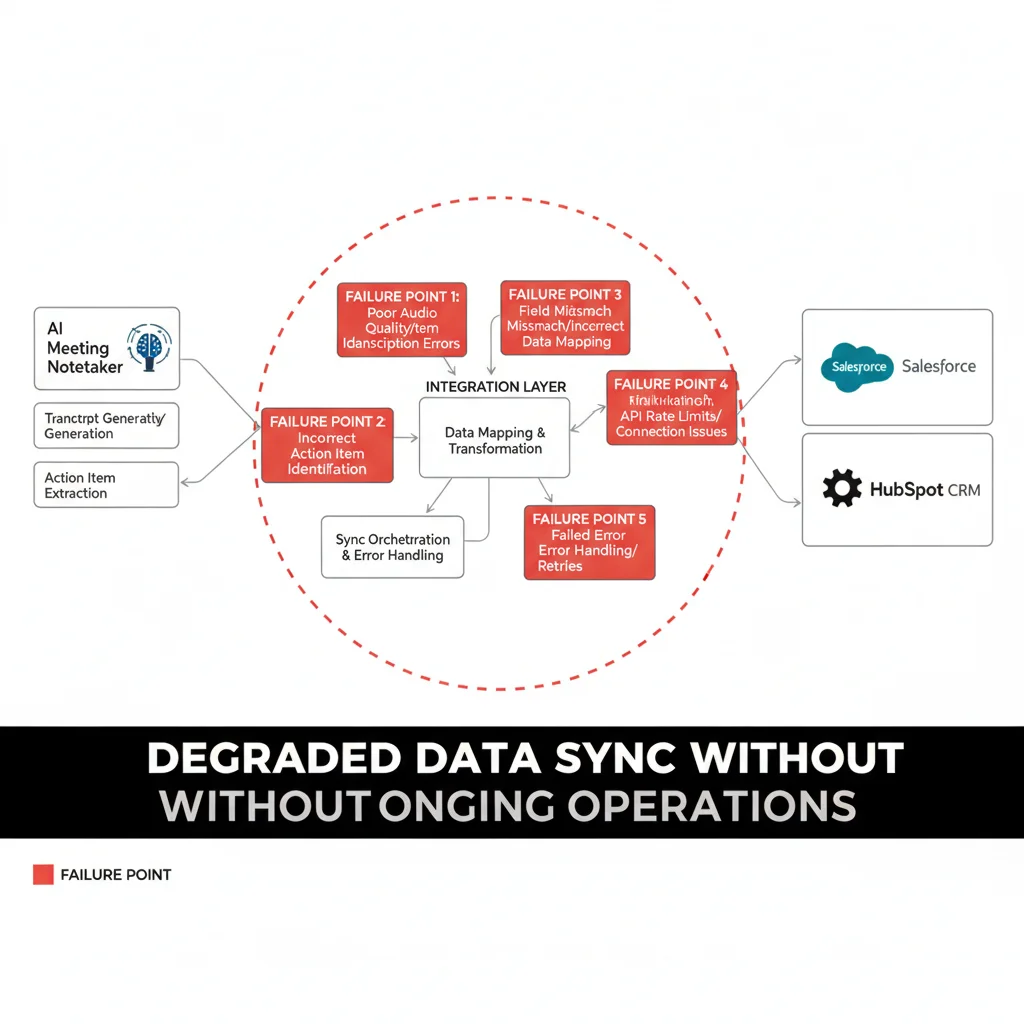
Week one always looks green. The first synced tasks have owners. Leadership screenshots the timeline.
Week three is where debt appears:
- Duplicate tasks from two bots on the same Zoom or Meet invite.
- Notes on the wrong opportunity because matching used email alone.
- Silent write failures after a required field or permission tighten.
- Field maps that break after a Salesforce package or HubSpot property change.
- Reps pasting summaries into Slack because they no longer trust the CRM.
The places that fail are predictable: identity matching, activity object choice, ownership defaults, error visibility, and change regression. Marketing slides rarely show the error log. Ops lives in the error log.
Cleanup cost is the real price. Three to six hours a week of sales-ops repair is too expensive for a five-person company—even if the vendor still calls the connector native.
A 90-day CRM data quality scorecard
Pilot on your real Salesforce or HubSpot org. Capture forty to fifty live calls across segments. Score weekly:
- Duplicate integration-created tasks under five percent.
- Manual cleanup under one hour per week.
- Zero reps still pasting notes after week three.
- Managers coaching from CRM activity without opening the notetaker.
- Within forty-eight hours of any permission, validation, or package change: sample twenty synced records.
Kill early if you cannot pause writeback cleanly. A connector you cannot stop is infrastructure you do not own.
Define one positive booking path: when a follow-up meeting lands, the same Contact and Opportunity the note used must be on the invite. Duplicate leads after a booked meeting means matching is theater.
Treat HubSpot with the same rigor. Associations and lifecycle mistakes create the same manager distrust Salesforce duplicates create.
How to pilot sync before you commit
Do not crown a vendor from a sandbox with three fields. Design the pilot like ops:
- Limited scopes: Contact, Lead, Task, Note, and only the Opportunity fields you use.
- Named owner: one human checks the error log every Monday.
- Pause drill: a non-founder must stop the bot and confirm new writes halt within an hour.
- Change drill: tighten one permission mid-pilot and watch whether failures surface or hide.
Prefer platforms that show the Salesforce or HubSpot error text, not a green synced badge that lied. Prefer remaps a non-specialist can babysit. Prefer one bot, not two “for comparison.”
Fireflies-shaped stacks often win when tiny teams need clearer retries and searchable libraries with less weekly babysitting. Lighter bots can be enough on simple HubSpot setups—until custom properties and multiple pipelines appear. The scorecard decides; the logo does not.
Write down three kill criteria before the pilot starts: duplicate rate above five percent for two weeks, cleanup above one hour for two weeks, or a permission change that hides failures. If you invent kill criteria after the dashboard looks green, you will keep a bad connector out of sunk-cost habit.
Also decide what “good enough” looks like for coaching. Managers need the objection, the next step, and the owner on the deal. They do not need a twelve-topic cloud. If those three fields are missing, the sync is incomplete even when the transcript is beautiful.
If outbound already consumes your ops minutes, do not add a second meeting bot to A/B Salesforce sync. Two bots double invite noise and double CRM clutter. An AI meeting assistant with Salesforce integration is a single write path you can own.
Weekly ownership so sync stays boring
Monday: open the sync error log. Screenshot permission and field failures. Assign one owner.
Tuesday: sample ten deals. Confirm owners, due dates, and that notes a closer needs are on the record.
Wednesday: pause drill on one recurring meeting.
Thursday: confirm one bot per invite—no dual notetakers.
Friday: keep or kill mapping changes. Do not “let it run” because the vendor dashboard looks green.
If the checklist exceeds thirty focused minutes, the integration is too expensive for your headcount.
What this URL will not do
We will not crown a universal 2026 winner for every Salesforce org. We will not send you into image-gen or slide-deck scatter. The keep cluster is sender, inbox, notes, and CRM truth. Meeting-bot sync is how call memory stays on the deal—not how you collect logos.
If your outbound connector is already creating duplicate tasks, fix that path first. Meeting writeback on top of a dirty Salesforce org multiplies noise. Sequence the work: domain and sender hygiene, then meeting notes, then inbox copilots. Adding three AI tools in one week is how tiny teams create a fourth job called “CRM cleanup.”
When the ninety-day scorecard passes, freeze the map. Do not keep adding custom fields because a vendor demo showed a prettier summary. Stability beats novelty once managers trust the opportunity timeline again.
Frequently Asked Questions
What is the best AI meeting assistant with Salesforce integration for a tiny team?
The assistant that keeps owners, tasks, and notes clean on your real org for ninety days with under an hour of weekly cleanup—and that a non-ops hire can pause. Connector badges do not answer that.
Why does Salesforce sync look fine in week one and break later?
Week one uses happy-path calls and loose permissions. Validation rules, custom fields, record types, and package updates usually surface silent write failures and duplicates after week three.
Is HubSpot sync easier than Salesforce for meeting notes?
Often lighter, but the ops question is the same: associations, lifecycle stages, and duplicate contacts. Demand the same scorecard on HubSpot that you demand on Salesforce.
How much weekly ops time should CRM sync cost?
Budget under one hour for log review and sampling. If cleanup hits three to six hours once call volume rises, the integration is creating debt.
Should we compare two meeting bots on Salesforce at once?
No. Two bots double calendar invites and CRM noise. Run one through a ninety-day scorecard, then replace only if it fails.