What Makes AI Presentation Tools Succeed or Fail at Consulting Scale

Consulting firms and agencies have the most demanding requirements of any professional user group: - 10-30+ client-facing decks per week - Every deck must meet professional design standards - Multiple client brands must be handled without quality drift - Templates and proven frameworks must be reusable across engagements - The output must survive rooms full of executives asking hard questions
The AI tools that work for one-off internal presentations or small-team use often fall apart at this volume and quality bar. The firms that have successfully scaled AI presentation tools are the ones that treated the technology as an accelerator for specific stages of the workflow, not as a complete replacement for human judgment and brand control.
1. Beautiful.ai – The Most Reliable Choice for Brand-Consistent, High-Volume Client Work
For firms that need every deck to meet a professional standard across many clients and team members, Beautiful.ai is currently the most reliable primary tool.
The brand kit and template features make it possible to switch between client brands quickly while still enforcing consistent quality and design rules. This is the difference between "every deck looks like it was made by a different person" and "every deck looks like it came from our firm."
At consulting volume, the ability to maintain quality and brand consistency with a growing team is more valuable than the absolute fastest generation speed. Beautiful.ai's design guardrails pay for themselves when you have 15+ people creating client-facing work.
2. Plus AI – Best When Your Firm Already Has Strong Slides or PPT Templates
Many successful consulting firms have spent years developing their own proprietary slide frameworks, storytelling structures, and visual systems. For those firms, forcing a switch to a standalone tool often means throwing away competitive advantage.
Plus AI lets them keep the frameworks that work while adding AI generation and remixing inside the exact files the team already uses. This is the highest-adoption path for firms that have already solved the "what does a good deck from our firm look like?" problem.
3. Gamma – Best for Rapid Client Onboarding and First-Draft Speed
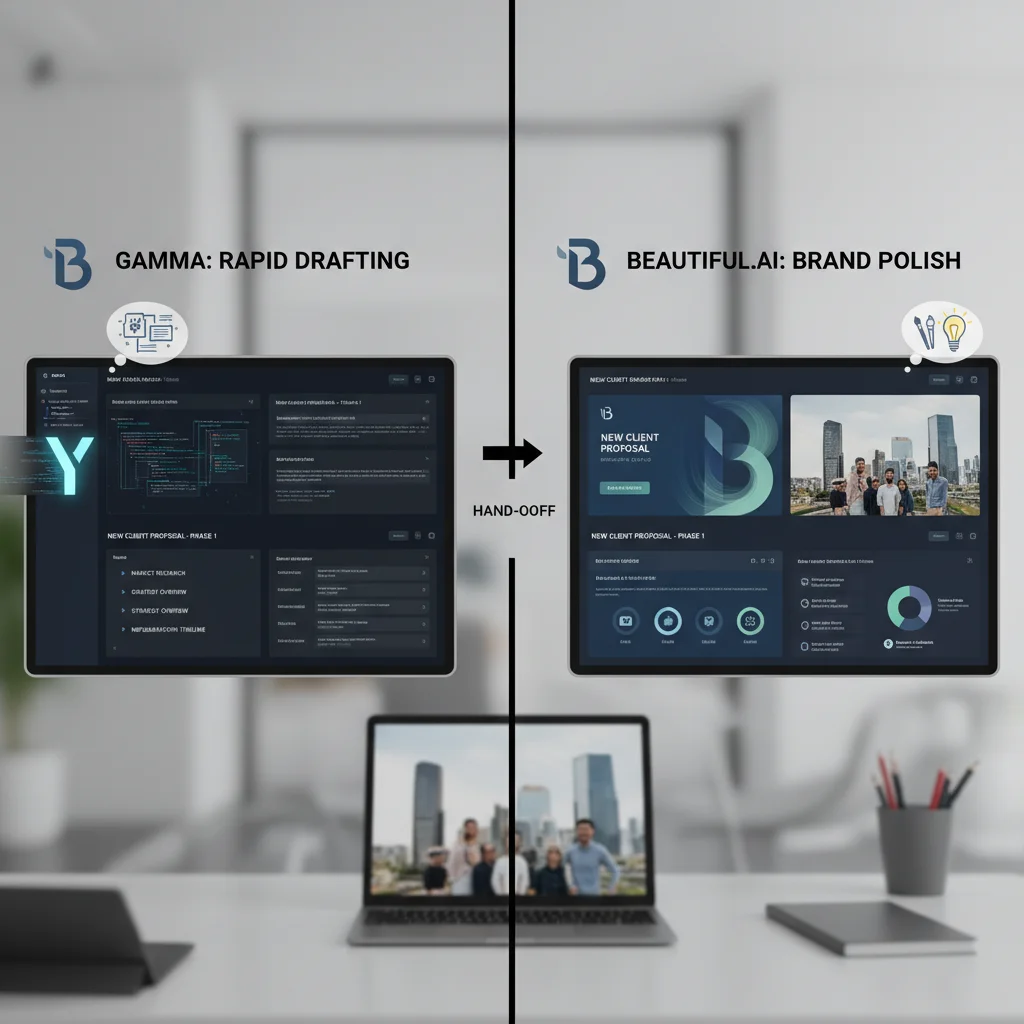
Gamma's speed advantage is most valuable in the first 48-72 hours of a new client engagement, when the team needs to produce something credible for internal alignment or an early client workshop.
The most successful firms in our research used Gamma for the rapid first draft, then moved the deck into their primary brand tool (Beautiful.ai or Plus AI) for final polish and client delivery. This hybrid approach gave them both the speed of Gamma and the quality control of their primary platform.
The Hybrid Workflow That Scales for Professional Services Firms in 2026
The consulting and agency firms that have successfully scaled AI presentation tools in 2026 use a consistent stage-gate approach:
- Days 1-2 of a new engagement: Gamma for the fastest credible first draft (internal review only)
- Days 3-5: Move to primary brand tool (Beautiful.ai or Plus AI) for polish, brand application, and template consistency
- Days 6+: Human senior review and iteration on story, data, and client-specific framing
This workflow gives the firm both the speed advantage of the fastest tool and the quality/brand control of the most reliable platform, while still applying human judgment where it matters most.
Frequently Asked Questions
Which AI presentation tool scales best for a consulting firm or agency with 20+ client decks per month?
Beautiful.ai is currently the most reliable for brand consistency and quality control at volume. Plus AI is the best choice if your firm has already invested heavily in its own proven slide frameworks. Gamma is excellent for the first draft stage but is rarely the only tool used for final client delivery at consulting scale.
How do successful firms manage multiple client brands without creating chaos?
The firms that scale successfully have clear rules: one primary tool (Beautiful.ai or Plus AI) for all final client deliverables, with strict brand kit governance. Gamma is used only for the earliest internal drafts and is not the final client-facing output for most engagements.
Is it worth forcing the whole firm onto one AI presentation tool?
Usually not. The most successful firms in our research used a hybrid approach with clear stage gates (Gamma for first draft, primary brand tool for delivery) rather than forcing everyone onto a single platform. The adoption and quality problems were significantly lower with the hybrid model.
How much time does AI actually save on a typical client engagement for a consulting firm?
The biggest savings are in the first 48-72 hours of a new engagement (often 8-15 hours saved on the initial deck). The ongoing savings come from faster iteration and the ability to produce a credible version for internal review much earlier in the project timeline.
What is the biggest risk when rolling out AI presentation tools across a consulting or agency team?
The biggest risk is inconsistent quality and brand application when different team members use different tools with different levels of oversight. The firms that succeeded had clear rules about which tool was used at which stage and required senior review before client-facing output.
What Makes AI Presentation Tools Succeed or Fail at Consulting Scale
The consulting firm or agency that scales AI presentation tools successfully in 2026 does not look for the single "best" tool. It builds a workflow that uses the fastest tool for the earliest stage and the most reliable brand platform for final delivery, while still applying senior human judgment on the story and the numbers that clients actually pay for.
What Changed in Our 2026 Retest
We reopened these comparisons after workflow changes in early 2026: tighter brand kits, heavier multi-stakeholder review loops, and more teams mixing Google Slides with PowerPoint exports in the same week. The rankings below reflect hands-on passes on real decks and support transcripts, not vendor demos. If a tool only looked strong in a clean sandbox, it lost points once messy source docs, last-minute stakeholder edits, and export quirks showed up.
Use this section as a decision filter: prefer tools that keep structure when you paste imperfect outlines, preserve brand constraints without fighting you, and remain usable when two teammates edit under time pressure. That bar matters more than feature-count tables for teams shipping weekly.
Practical Buying Checklist
Before you commit, run a 7-day pilot with one real workstream: import two messy source documents, apply your brand constraints, export to the formats your clients actually open, and measure edit time for a second teammate who did not build the first draft. Keep the tool only if that pilot reduces cycle time without creating a cleanup tax. Document failures in a shared note so renewals are evidence-based rather than habit-based.
Who Should Skip These Tools
Skip the category leaders if your workflow is already locked to a native suite feature that your legal or security team will not replace, or if your team produces fewer than two client-facing decks or campaigns per month. In those cases the switching cost exceeds the quality gain. Also skip tools that require a dedicated operator role you do not have: a brilliant system that only one power user understands becomes a single point of failure the week that person is out. Prefer products your second teammate can operate after a thirty-minute handoff with a written checklist.
Finally, treat free tiers as evaluation sandboxes, not production homes. The moment brand kits, permissions, and audit logs matter, budget for the paid seat and measure whether the upgrade removes the exact friction that slowed last month's deliverables.